Daily crew dispatch software that texts everyone where to be
One board, one day at a time: every job with work scheduled today, the sub on it, what they're doing, and a one-tap text that sends them the address and details. No morning phone tree.

- Every morning starts with the same round of 'you're at the Miller place today' calls.
- A sub shows up at the wrong address, or not at all.
- You don't realize two crews are double-booked until one of them calls you from an empty driveway.
Today, on one board
Pick a day and see every project with work scheduled — each phase, the sub assigned, and its jobsite. Arrows step you a day forward or back; the counters up top tell you how many crews are out and how many jobs still need one.
Everything a crew needs on one card
Each card shows the service, what the work is, the assigned sub, and a map link to the jobsite. It's the morning huddle without the huddle.

Send them to work in one tap
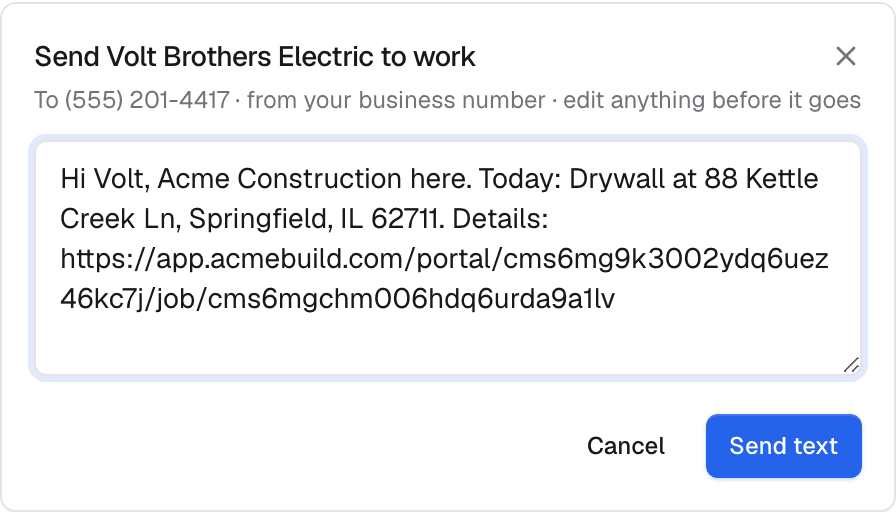
Hit 'Send to work' and it drafts a text from your business number — the sub's name, today's job, the address and a link — for you to tweak and send. The message is logged to your inbox, so there's a record of exactly what went out.
Nothing falls through
Jobs with work today but no crew assigned get their own 'needs a crew' section, so an unstaffed phase can't hide. And if the same sub is booked on two sites the same day, an amber banner names them and the two jobs — before they find out the hard way.
What it does while you sleep
These run on their own — no reminders to remember, no tabs to check.
- Builds today's crew board from the project schedule automatically
- Drafts a jobsite dispatch text from your business line
- Logs every dispatch to your inbox as a record
- Flags a sub double-booked across two sites the same day
It doesn't work alone
Daily Crew Dispatch hands off to the rest of the system automatically.
See Daily Crew Dispatch on your own jobs
A 30-minute walkthrough on real-looking data for your trade.
Frequently asked questions
Where does the dispatch text come from?
From your business number, so the sub sees your company — not a personal cell. You edit the drafted message before it goes, and it's recorded in your inbox.
How does the board know who's working today?
It reads your project schedules. Any phase whose work window includes today shows up, with the sub already assigned to it — no separate day-planning step.
What if a job has no sub assigned yet?
It lands in a 'needs a crew' section on the same board, so unstaffed work is impossible to miss on the morning it matters.